
English
Calls dashboard
Two layouts for a vault where calls are recorded, transcribed and reviewed: a timeline of long-running threads, and a screen where you check what was proposed about one call. Both read plain notes and write back with updateNotes. Why they are built this way is in Calls become threads.
trip2g does not record, transcribe or review calls. Something else writes the transcript, review and topic-map notes: a recorder that saves into the vault, a script, or an agent with an API key. The two layouts read those notes. They write only the edits note of a call, the hidden key of a thread, and a person note when you add someone new.
The demos run on invented data. A visitor can click everything, but changes stay in the tab; the site owner's changes are saved to the notes. The demo notes carry search: false on purpose, so the invented calls stay out of the site's search.
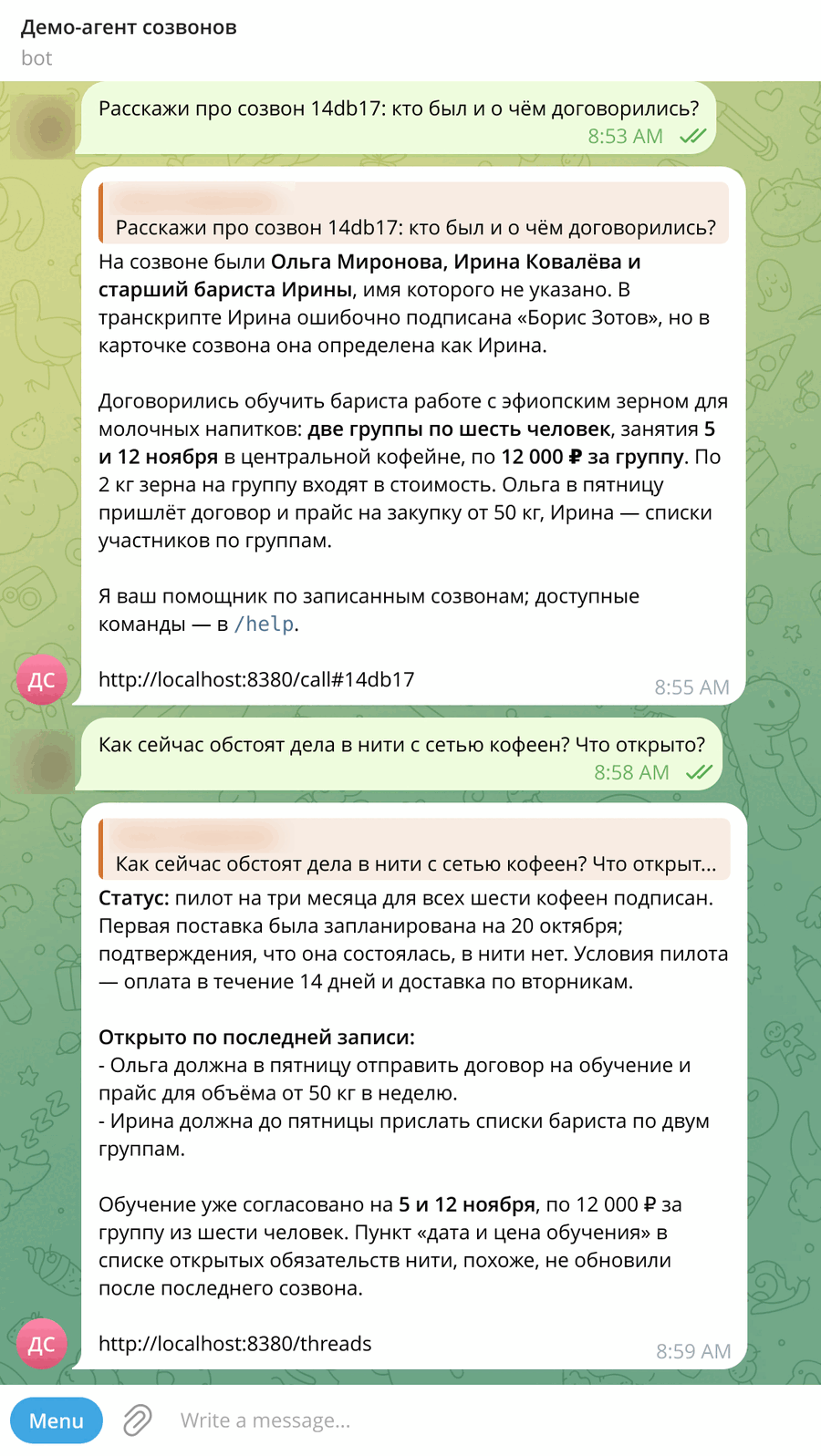
A ready stand: an agent reviews calls and answers in Telegram
The trip2g/call_dashboard repository brings the whole thing up with one docker compose: trip2g with these layouts, fleet with three roles, and a Hermes agent with a Telegram bot. The models are Codex on a ChatGPT plan. Who does what:
- trip2g stores the notes, draws the
/calland/threadspages, calls a webhook when a note changes, and serves the vault over MCP and GraphQL. It does not review calls itself. - fleet (roles are notes in
roles/) does the reviewing: thereviewrole writes the review of a new transcript,topicsthe topic map,chronologya line in a thread once you have checked the call and picked the thread. - Hermes answers questions about calls and threads in Telegram. It reads the vault through trip2g's MCP as its knowledge base and cannot write to it. Every answer about a call ends with the call's page, every answer about a thread with the threads page.
- A notify script runs on cron every minute, looks for new reviews over GraphQL and sends the call's link to Telegram. It does not call a model.
- codex-bridge turns fleet's chat-completions calls into Codex Responses API calls with the ChatGPT login Hermes keeps.
flowchart TD
  You((owner))
  TG[Telegram]
  HM[Hermes]
  N[cron notify]
  V[(trip2g: notes and pages)]
  F[fleet: review, topics, chronology]
  X[(Codex)]
  You <--> TG
  N -- link --> TG
  TG <--> HM
  You -- checks --> V
  HM -- MCP, read --> V
  N -- GraphQL --> V
  V -- webhook --> F
  F -- writes --> V
  F --> B[codex-bridge] --> X
  HM -- directly --> X
The stand's history is prepared: eleven past calls, their reviews and eight threads ship in the repository as ready notes. What is reviewed live is a call you add yourself; the repository has a sample transcript where the recorder labelled the client with someone else's name.
Recording calls: Amanu
Calls can be recorded with Amanu, a free, open-source (MIT) app for macOS and Windows. It starts recording when a call app takes the microphone and stops when the call ends. The microphone and the other side go to separate channels, so the transcript keeps the two sides apart as me and them. Transcription runs locally; the audio goes nowhere.
How Amanu feeds trip2g:
- Download the onboarding archive from your instance and unpack it. It is a ready Obsidian vault: the sync plugin is set up and the API key is inside.
- In Amanu's settings, point
recordings_dirinside that vault and turn onkeep_audio, so the audio stays for the player. - Set
on_stopto the amanu-to-trip2g.mjs hook, with an absolute path tonode. After every meeting it writestranscripts/<date>-<id>.mdin the format the roles and the call page read, embeds the recording and runs the sync. Names Amanu guessed go in only as a hint: who spoke is decided by you on the call page. - The
calls/transcriptlayout shows the transcript with a player: clicking a timecode plays that line.
A recording weighs about 0.5 MB a minute, so raise MAX_REQUEST_BODY_SIZE to at least 50 MB, or calls longer than 20 minutes will not upload.
Which engine
One real Russian call, 40 minutes, two speakers, a MacBook with Apple M3 Max (48 GB). Accuracy was measured on five 30-second fragments (370 words) against a Deepgram nova-3 reference, and over the whole call against Krisp's transcript.
| Parakeet v3 | GigaAM v3 | Whisper large-v3-turbo | Krisp | |
|---|---|---|---|---|
| Errors on the fragments | 13.0% | 11.9% | 25.4% | 22.4% |
| WER against Krisp, whole call | 19.8% | 25.7% | 22.4% | — |
| Transcribing 40 minutes | 20 s | 20 s | 59–136 s | cloud |
| Model load, once | 54 s | 17 s | 34 s | — |
| Memory (RSS) | 0.3–0.5 GB | 0.4–0.6 GB | 1.0–1.4 GB | — |
Parakeet is Amanu's default and worth keeping: nearly as accurate as GigaAM, with tighter timecodes (96% of Krisp's lines start within 3 seconds), and it runs on the Neural Engine without slowing the Mac. GigaAM is the fallback for Russian. Whisper is slower and makes twice the errors. Parakeet writes English words in Cyrillic; Whisper keeps them in Latin.
The local engines do not tell apart several people on one side: three people on the other end all become them.
On your own server
The same repository has an Ansible playbook that installs the whole stand on a bare Ubuntu 24.04 server: trip2g, the fleet roles, Hermes with a Telegram bot, and Caddy with HTTPS on your domain. The cheapest server is enough: 2 cores and 4 GB.
The playbook is written to be run by an AI agent, not a person: ansible/AGENTS.md lists what to ask the person, which commands to run, how to check each step and what to hand back at the end. An agent given only the repository link and an empty server installed everything in 17 minutes. The person does one thing: the Codex sign-in in a browser.
There is no password sign-in. You sign in:
- with a one-time link:
docker compose exec -T trip2g /trip2g login-linkon the server; the link lives 5 minutes; - with a button in Telegram: ask the bot for a sign-in link. It arrives as a button, not text — a model that retypes a long link breaks it;
- with an email code, once mail is connected (SMTP or Resend);
- with Google or GitHub (OAuth).
The agent on the server also keeps its own vault: it saves notes and syncs them with trip2g both ways, so edits made on the site come back to it.
Install
Copy three files from docs/_layouts/calls/ into your vault's _layouts/calls/: threads.html, call.html and frontmatter.js. Then make a note for each page:
---
title: Threads
layout: calls/threads
---
---
title: Call
layout: calls/call
owner: Dana Whitfield
---
The body of the page note is shown under the title.
The notes the pages read
| Note | Default folder | What it holds |
|---|---|---|
| Transcript | transcripts/ |
Speaker | MM:SS lines, each followed by what was said. Optional title and duration_min in frontmatter |
| Review | calls/ |
type: review, transcript: path, speakers: map from label to name, optional speakers_confidence: (unknown marks a label), assumed: true when the speakers or topics were guessed, optional date: (without it, the date in the transcript's path, then in the review's). The first line of the body is the agenda |
| Topic map | topics/ |
Same file name as the review. Optional title, shown as the call's name instead of the agenda. A summary paragraph, then a ## Topics section of MM:SS | topic lines |
| Thread | threads/ |
type: thread, group, kind, status, people, aliases, optional priority and hidden, optional last date that orders a thread whose chronology links no call yet. A ## Chronology list, one line per call, and a ## Open items list |
| Person | people/ |
One note per person; its title is the name. confirmed: false marks a guess. A file whose name starts with _ is skipped |
| Category | categories/ |
type: call-category, order, optional kind (client turns on the sales score) |
| Edits | call_edits/ |
Written by the one-call page, one note per call |
A call's id is the file name of its review note. The topic map and the edits note use the same name.
A chronology line starts with a link to the call, labelled with its date:
## Chronology

- [[calls/c8e1a5|2026-07-31]]: Tax due on the 25th.
  Decided: depreciate the roaster. Open: send the invoice.
- 2026-10-01: The accountant sent a template by email.
A line that links to a review or a transcript is a dot on the timeline, dated by the link's text. A line without one, such as a letter or a decision made outside a call, appears in the thread's chain but not as a dot. Decided: and Open: start new lines in the side panel. The headings and these words are settings; the Russian demo uses «Хронология», «Решили:» and «Открыто:».
Threads page settings
| Key | Default | Meaning |
|---|---|---|
threads |
threads/* |
Glob of thread notes |
reviews, transcripts |
calls/*, transcripts/* |
Globs that tell a call link from any other link |
thread_type |
thread |
The type a thread note carries |
chronology_heading |
Chronology |
Heading of the chronology list |
open_heading |
Open items |
Heading of the open items list |
outcome_labels |
[Decided, Open] |
Words that start a new line in the chain |
groups |
empty | Order of the groups; without it, groups follow their top thread: by priority first, then by activity |
stale_days |
21 |
Days without a call after which a thread is quiet |
span_months |
3 |
Months shown on open |
today |
the current date | Fixes "today", for a demo |
locale |
en |
Dates, month names and plural forms |
ui |
English | Interface strings, see below |
Inside a group, threads are sorted by priority, then by activity: recent calls weigh more, and the weight halves every three weeks without a call. Hide thread sets hidden: true in the thread's frontmatter; Hidden in the toolbar shows hidden threads again.
One-call page settings
| Key | Default | Meaning |
|---|---|---|
owner |
empty | Your name as it appears in speakers; that label shows "this is you" |
reviews, topics, transcripts |
calls/*, topics/*, transcripts/* |
Globs |
people, threads, categories |
people/**, threads/*, categories/* |
Globs |
edits |
call_edits |
Folder for the edits notes |
people_folder |
people |
Where + new person creates a note |
review_type, thread_type, category_type |
review, thread, call-category |
The type values the page looks for |
topics_heading |
Topics |
Heading of the topic map section |
topic_line |
{tc} | {text} |
Shape of a topic line |
transcript_line |
{who} | {tc} |
Shape of a transcript speaker line |
pending_since |
empty | Date; transcripts from it on that have no review are listed as waiting |
transcripts_inline |
false |
Put every transcript into the page instead of loading it on demand |
scores |
three scores | List of key, label and optional only_kind |
subgraph |
empty | Added to the notes the page creates, see en/user/subgraphs |
locale, ui |
en, English |
As above |
A call counts as waiting for your check while it has assumed: true and its edits note lacks any of the four verified marks: speakers, category, threads, topics. All verified sets all four and opens the next call that waits.
Edits save themselves a second after the last change. The page keeps them in call_edits/<id>.md, never in the review: the review belongs to whoever wrote it, and the edits note belongs to the page. Saving checks the note's hash first, so an edit made elsewhere in the meantime is not overwritten.
Transcripts are loaded one at a time with the ReadNote query, which is the notePaths query from Read a note's markdown. From the page, only the site admin's session can call it, so a public demo sets transcripts_inline: true instead.
The edits note
The one-call page writes call_edits/<id>.md, one note per call. Its frontmatter is the contract for anything that reads your checks:
| Key | Holds |
|---|---|
call |
The call's id |
review |
Path of the review note |
category |
Path of the category note |
speakers |
Map from a speaker label to the path of a person note |
threads |
Paths of the thread notes the call belongs to |
topics_wrong |
Timecodes of the topics marked wrong |
topic_threads |
Map from a topic's timecode to a thread path |
extra_topics |
Topics that were missed, one string each |
scores |
Map from a score key to a number from 1 to 10 |
outcome |
What was decided and what stayed open, as text |
verified |
Which of speakers, category, threads and topics you checked |
updated |
Time of the last save |
The body repeats the same in readable form. The demo has one: the edits note of the staging review. Nothing in trip2g reads it back into the review. Whatever writes the reviews can read it on its next pass: take the speaker you picked, drop a topic you marked wrong, add the chronology line for a thread you chose. That reader is yours to build.
Interface language
Every string has an English default. To translate, list the keys under ui in the page note; the Russian demo pages carry the full list. A count takes plural forms:
locale: ru
ui:
  search: "Найти нить"
  calls:
    one: "{n} встреча"
    few: "{n} встречи"
    many: "{n} встреч"
    other: "{n} встречи"
The forms follow Intl.PluralRules for the locale.
Limits
- The page puts every review, thread and topic map matched by its globs into the HTML. A few hundred calls are fine; thousands are slow.
- The layouts read frontmatter in the browser with a small parser (
frontmatter.js): maps, lists and|/>blocks, no anchors or tags. - Nothing links a call to a thread automatically. The one-call page lists the threads whose notes link to that call, and saves the threads you pick in the edits note; whatever keeps the thread notes adds the chronology line.
- A save takes two requests: it reads the edits note's hash, then writes. Closing the tab within a second of an edit makes the browser ask you to stay; leaving anyway can lose that last edit.